
A teacher, a real estate agent and a company CEO all end their emails with a signature, but they need very different things from those few lines. This collection of email signature examples is organized by job, so you can jump to your role, see what matters for it, and copy a sample that's ready to adapt.
For the basics that apply to everyone, such as which details to include and what to leave out, see the checklist in our Gmail signature guide. This article skips the basics and goes straight to role-specific ideas. Every name, number and address below is made up, so swap in your own and delete any line you won't use.
Email signature examples by job
Student or recent graduate
Recruiters and professors want to know what you study, when you finish, and where they can see your work. Don't invent a job title you don't have yet. Your degree and expected graduation date do that job.
Yara Mansour
BSc Computer Science, Cairo University · Graduating June 2027
+20 10 0000 0000 · linkedin.com/in/yara-mansour-example
Portfolio: yaramansour.example.com
Applying for internships? A short line such as "Open to summer internships in data analysis" can sit under your name, as long as you remove it once you've found a place. Pair the signature with a strong application email using our cover letter guide.
Freelancer
A freelancer's signature works like a small sales page. Say what you do in plain words, point to proof of your work, and make the next step easy.
Hana Saleh
Freelance Copywriter for SaaS and Fintech Brands
hanasaleh.example.com · +966 50 000 0000
[Button: See recent work]
Avoid listing every service you offer. "Copywriter for SaaS and fintech brands" tells a client more than "Writer | Editor | Translator | Strategist."
Sales representative
In sales, the signature is a working tool. Put your direct line first and add one clear call to action, because an interested buyer wants the shortest route to you.
Tariq Nabil
Senior Account Executive · Gulf Region
Brightline Software
Direct: +966 50 000 0000 · WhatsApp: +966 50 000 0000
[Button: Book a 15-minute demo]
If you use WhatsApp with clients, label it, so people know which number takes messages. Keep promotional banners out of your reply signature, where they repeat in every message of a thread.
Doctor or clinic staff
For a clinic, the signature should guide patients to the right channel. Include the booking number and opening hours, and add a short line saying the inbox isn't for urgent matters.
Dr. Laila Fathy
Consultant Dermatologist
Nile Skin Clinic · Building 12, Maadi, Cairo
Appointments: +20 10 0000 0000 · Sun–Thu, 10:00 a.m.–8:00 p.m.
Please don't send urgent medical questions by email. In an emergency, contact your local emergency services.
If your clinic or hospital has approved wording for patient emails, use that instead of writing your own.
Teacher
Teachers write to parents, students and colleagues, usually from a school account. The most useful extras are when you're available and how quickly you reply, which saves a lot of follow-up messages.
Ms. Rana Adel
Grade 5 Science Teacher · Al Waha International School
Office hours: Mon and Wed, 1:30–2:30 p.m.
I reply to parent emails within two school days.
Leave your personal phone number out. If parents need to call, give them the school office number.
Engineer
Engineers need a clear specialty and a link or company name that shows their work. For civil, mechanical or electrical engineers, that's usually the firm. For software engineers, GitHub often matters more than a logo.
Eng. Fares Hamdy
Mechanical Engineer, HVAC Design
Delta Build Contracting · Riyadh
+966 50 000 0000 · deltabuild.example.com
A software version:
Nour Elsayed · Backend Engineer, Payments Team
Cedar Lane Tech · github.com/nour-example
If you hold a professional registration that matters to your clients, one short line for it is enough.
Real estate agent
Buyers save agents' emails and come back weeks later, so your signature has to work as a contact card. A photo helps people remember who they spoke to, and WhatsApp is often the quickest route. If your market requires a license or registration number in advertising, give it its own line.
Majed Al-Harbi
Real Estate Agent · North Riyadh Residential
Qasr Homes Realty
+966 50 000 0000 · WhatsApp available
License no. [your number] · qasrhomes.example.com
Lawyer or consultant
Professional services signatures should look calm and precise: your full professional title, the firm's name and, where your firm uses one, a short disclaimer. A disclaimer that fits the work you do is more useful than a long generic paragraph.
Adel Mostafa
Partner, Corporate and Commercial
Mostafa & Rizk Law Firm · Cairo
+20 10 0000 0000 · mostafarizk.example.com
This email is for the named recipient only and is not legal advice unless we have agreed in writing to act for you.
Check any disclaimer with your firm before using it. Don't copy one from the internet and assume it fits.
Small business owner
Customers want three answers from a business owner: what you sell, when you're open, and how to reach you. A short tagline and your hours do more than a row of social icons.
Salma Gad
Owner, Crumb & Co. Bakery
Fresh sourdough and custom cakes, baked daily
Open Sat–Thu, 8:00 a.m.–10:00 p.m. · +20 10 0000 0000
Instagram: @crumbandco.example
Customer support agent
Support emails often come from a team, so the signature should set expectations rather than sell. Point to self-help, give your hours with a time zone, and remind people to keep their ticket number in replies.
Mariam, Customer Support · Kotoba App
We're here Sun–Thu, 9:00 a.m.–6:00 p.m. (GMT+3)
Help center: help.kotoba.example.com
Please keep your ticket number in the subject when you reply.
A first name alone is common in support. It protects the agent's privacy, and customers rarely need a surname.
Executive
Senior leaders usually have the shortest signatures. Your name and role carry the weight, and badges or quotes only make it look busy. If an assistant manages your calendar, their contact is more useful than your mobile.
Hesham Kamal
Chief Executive Officer
Sahara Logistics Group
Office of the CEO: Mona Ali, +20 10 0000 0000
Designer
Designers are tempted to turn the signature into a showcase. Resist it. Large images may be blocked or look broken in some inboxes, so let one portfolio link do the showing.
Lina Ezz
Motion Designer · 2D Animation and Explainer Videos
lina-ezz.example.com · Behance: behance.net/lina-ezz-example
+966 50 000 0000
Quick comparison: what each role should add
| Role | Most useful extra | Layout idea |
|---|---|---|
| Student or graduate | Degree and graduation date | Compact |
| Freelancer | Portfolio link or button | Two-Column |
| Sales | Booking button and direct line | Two-Column |
| Doctor or clinic | Booking number, hours, non-urgent note | Stacked |
| Teacher | Office hours and reply time | Compact |
| Engineer | Specialty, company or GitHub | Compact or Two-Column |
| Real estate | Photo, WhatsApp, license line | Two-Column |
| Lawyer or consultant | Firm name and a fitting disclaimer | Logo Side |
| Small business owner | Tagline and opening hours | Logo Side |
| Customer support | Help center and ticket reminder | Compact |
| Executive | Assistant's contact | Stacked or Compact |
| Designer | One portfolio link | Two-Column |
The layout names match the layouts in DraftPik's signature generator. Treat them as suggestions, not rules.
Turning a sample into a designed signature
A text sample is a starting point. To add a photo or logo, clickable links and a consistent design, you can build it in the DraftPik email signature generator:
- Fill in the Content tab. Add your name, title, phone and website, then use Add details for the extras your role needs, such as WhatsApp, Calendly, GitHub, Behance or a portfolio link.
- Add your company, department and logo if your role calls for them, for example a clinic, a firm or a shop.
- Turn on the button for roles with a clear next step, such as sales or freelancing, and link it to your booking page or portfolio.
- Use Notes & Disclaimer for a confidentiality note or a clinic's non-urgent line. You can edit the disclaimer text.
- Pick a template and layout in the Customize tab, then check the PC and phone previews.
- Click Copy Signature and paste it into your email app. Our guides to adding a signature in Gmail and adding a signature in Outlook cover that step.
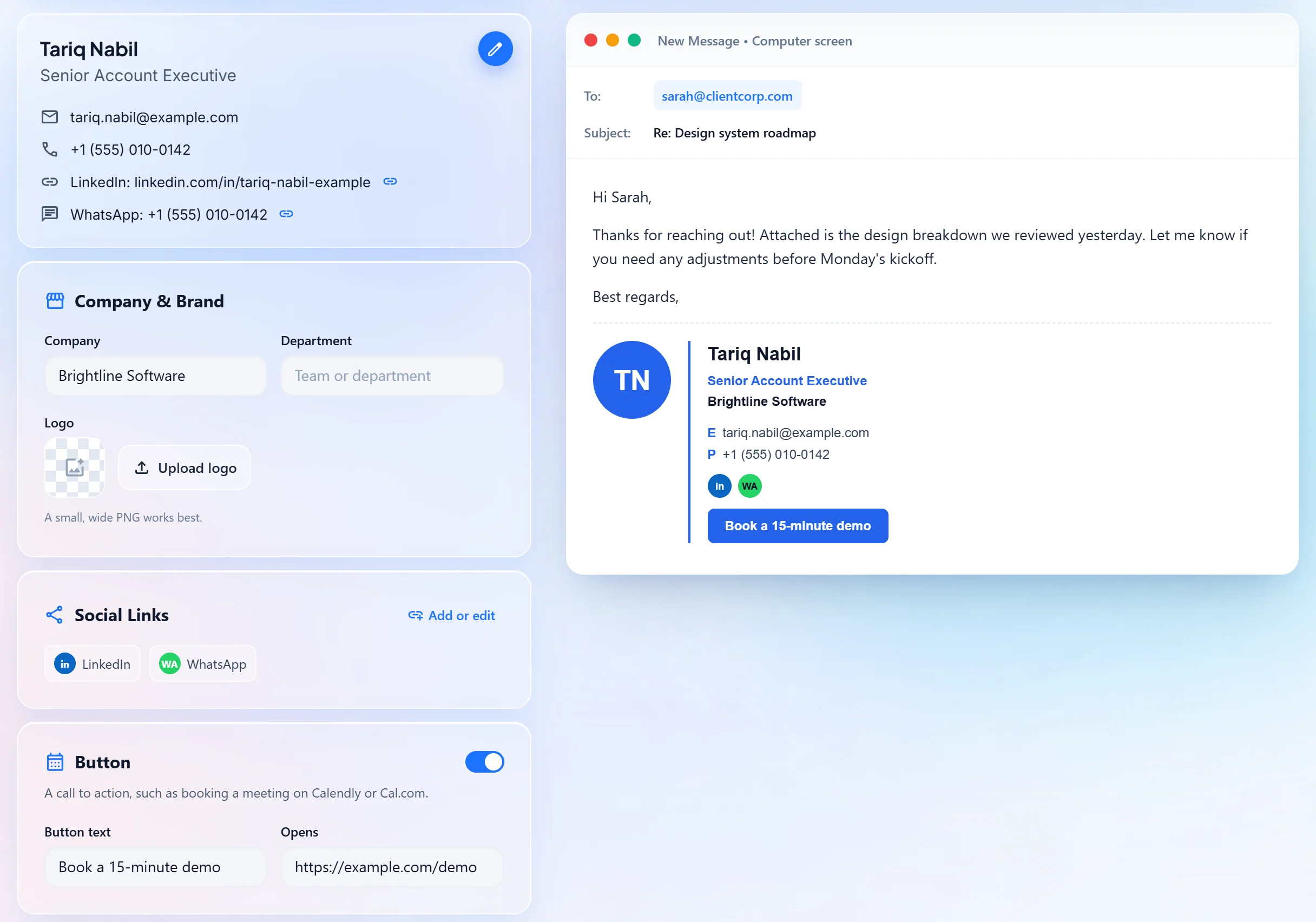
You can start for free. Copying needs a free account, the Free plan keeps one saved signature, and each copy counts toward the 10 downloads a day. Pro costs $4.99 a month or $29.99 a year and unlocks every template, with no daily limit.
FAQ
Should my signature change when my role changes?
Yes. Update it the same day your title, team or phone number changes. An outdated title confuses clients and colleagues more than no title at all.
Can I use one signature for two jobs?
It's usually clearer to keep two. If you're employed and also freelance, use the company signature on your work account and a freelance one on your personal address. Mixing both into one block makes each look less serious.
Should I include a photo?
A photo helps in roles built on personal relationships, such as sales, real estate, freelancing and consulting. In support and many corporate roles, a logo or plain text is more common. Either way, keep the image small.
Do I need a short version for replies?
It helps in every role. A single line, such as "Majed Al-Harbi · Qasr Homes Realty · +966 50 000 0000," keeps long threads tidy, and most email apps let you set a separate signature for replies.
Find your role above, copy the sample and replace the details with your own. Then open the DraftPik email signature generator to add your photo or logo, choose a layout and copy a finished signature into your inbox. Creating one signature and copying it is free with a free account.