Most CV mistakes aren't dramatic. A vague bullet here, a date in a different format there, a file called CV-final-2.docx. Each one is small, but together they make the reader work harder, and a recruiter with a long pile of applications can easily set a hard-to-read CV aside. Below are 15 common CV mistakes, grouped by where they happen, and each one comes with a fix you can make in a few minutes.
How to use this list
Open your CV next to this article and go through it mistake by mistake. Work in this order:
- Content first. There's no point polishing the layout of a bullet you're about to rewrite.
- Formatting second. Once the words are final, make them consistent and easy to scan.
- Delivery last. File format, file name and the message you send with it.
CV mistakes in your content (1 to 8)
1. Sending the same CV to every job
A generic CV tries to fit every role, so it doesn't clearly fit any of them. The reader has to work out for themselves why you're relevant.
The fix: Keep one master CV with everything you've done, and spend ten minutes adjusting it for each application:
- Rewrite the last line of your summary to name the role you're applying for.
- Move the bullets that match the job ad to the top of each role.
- Use the ad's wording for skills you really have. If it says "inventory planning," don't write only "stock control."
An accountant applying to an audit firm and to a retail chain can use the same facts but lead with different ones: audit preparation for the first, month-end closing across branches for the second.
2. Listing duties instead of achievements
"Responsible for customer accounts" tells the reader what the job was, not what you did with it.
The fix: Use the pattern action verb + what you did + the result.
| Duty-style bullet | Achievement-style bullet |
|---|---|
| Responsible for shipment scheduling | Planned daily dispatch for 3 warehouses and cut late deliveries over two quarters |
| Taught math to secondary students | Introduced weekly practice quizzes for 4 classes and set up a peer-tutoring hour |
| Handled key accounts | Managed 25 retail accounts and renewed every contract that came up in 2025 |
The examples are made up, so use your own facts. If you don't have exact numbers, describe the scale (team size, number of clients, countries) or a concrete outcome.
3. A summary that could belong to anyone
"Motivated, hardworking professional seeking a challenging role in a dynamic company" says nothing a reader can check.
The fix: Write two to four lines that cover your role, your experience, your specialty and what you want next:
Logistics coordinator with 5 years in e-commerce fulfilment. I plan daily dispatch for three warehouses, work with carriers on delivery issues and report weekly on performance. Looking for a supply-chain analyst role.
For more formulas and examples, see our guide to writing a CV summary.
4. Burying your strongest material
Readers start at the top of the page and often skim the rest. If your most relevant experience is on page two, or in the fourth bullet of an old job, it may never get read.
The fix: Put whatever best proves you fit the job near the top. That usually means your latest role first, with its strongest bullets first. If you've just graduated, education and projects can come before experience. If you're changing careers, a short projects section can sit right below the summary.
5. Skills that say nothing
"Computer skills," "MS Office" and "team player" are on almost every CV, so they don't set you apart.
The fix: Name the actual tools and methods, such as Excel (pivot tables, XLOOKUP), SAP S/4HANA, Figma or IFRS reporting. For human skills, list only the ones you could back up with an example in an interview, and make sure your experience bullets show them too.
6. Exaggerating or inventing
An inflated job title, a guessed percentage or "fluent" in a language you couldn't interview in can all come up later, usually at the worst moment.
The fix: Write your title as it was. If it's unclear outside your company, add a short explanation, for example Associate (Financial Analyst). When you aren't sure of a number, describe the work instead of inventing a figure. Treat every line as something you may be asked about.
7. Confusing dates and unexplained gaps
Missing months, overlapping roles with no explanation, or "2021 – 2022" for a job that lasted six weeks all make the reader stop and wonder.
The fix: Use month and year for every role, in one format, and "Present" for your current job. If you have a gap of several months, a short, honest line is enough: Career break: family care (Jan 2023 – Mar 2024), or a course you completed during that time. Never fill a gap with a job that didn't exist.
8. Outdated or irrelevant details
High school details when you have a degree, a course from ten years ago in an unrelated field, or every part-time job you've ever had. Each one pushes your relevant content down the page.
The fix: Ask one question about every line: does this support this application? If not, cut it or shrink it. Older roles can drop to one or two bullets, and very old ones can be summarized in a single line.
Formatting mistakes (9 to 12)
9. Typos and grammar slips
A spelling mistake in "detail-oriented" undermines the claim. Typos in tool names, like "Javascript" for "JavaScript" or "Powerbi" for "Power BI," suggest you don't use them often.
The fix: Use a proofreading routine, not a single read:
- Run a spell-check, then read the whole CV aloud.
- Check every company, product and tool name against its official spelling.
- Use past tense for past roles and present tense for your current one.
- Ask someone else to read it. Fresh eyes catch what yours skip.
10. Inconsistent formatting
03/2022 in one job, March 2022 in the next. Some bullets end with a full stop and some don't. Bold appears at random.
The fix: Make each decision once and apply it everywhere: one date format, one bullet style, one font family, and bold only for job titles or one key figure per bullet.
11. The wrong length
There are two ways to get this wrong: three pages that include everything, or a squeeze onto one page with tiny text and no margins.
The fix: One page usually works early in your career, and two pages are common for experienced professionals. To shorten, cut your weakest bullets first, then older roles, and tighten the spacing slightly before you shrink the font. Body text around 10 to 12 pt stays comfortable to read.
12. A layout people and software can't follow
Text inside images, creative headings like "My Journey," skill bars with no skill names written out, and contact details shown only as icons all make a CV harder to read, especially when it goes through an applicant tracking system (ATS).
The fix: Use standard headings such as "Experience," "Education" and "Skills," keep all important information as real text, and run a quick test: copy all the text out of your PDF, paste it into a plain text editor and check that it still reads in a sensible order. Our guide to an ATS-friendly CV covers this in more detail.
Details and delivery mistakes (13 to 15)
13. Unprofessional or broken contact details
An old nickname email address, a phone number without the country code, or a LinkedIn link that leads to an error page.
The fix: Use an email address based on your name, write your phone number with the country code (for example +20 or +966), and click every link in the final PDF before you send it.
14. Personal details that don't fit the job or the country
What a CV should include varies a lot by country and employer. A photo, date of birth or marital status is expected in some places and left off in others. Some employers ask for details such as nationality or visa status, and others don't want them.
The fix: Read the job ad and check what's normal where you're applying. Include what's asked for or clearly relevant, and leave the rest off. If an application form has fields for these details, use them rather than adding everything to the CV.
15. A careless file and an empty email
A Word file whose layout breaks on the recruiter's computer, a file name like CV-new-FINAL.docx, a CV in a different language from the job ad, or an email with an attachment and no message.
The fix:
- Send a PDF unless the employer asks for another format.
- Name the file clearly: Firstname-Lastname-CV.pdf.
- Match the language of the job ad. If you're unsure, our guide on whether to send an Arabic or English CV can help you decide.
- Write a short message: the role you're applying for, one line on why you fit, and a thank-you.
A five-minute check before you send
- Does the summary mention this role or this kind of company?
- Are the most relevant bullets at the top of each job?
- Is every date in the same format, with no unexplained gaps?
- Is there a number or concrete result in most recent bullets?
- Did you read it aloud and check the names of tools and companies?
- Do the email address, phone number and every link work?
- Is the file a PDF with your name in the file name?
Catching these mistakes in DraftPik
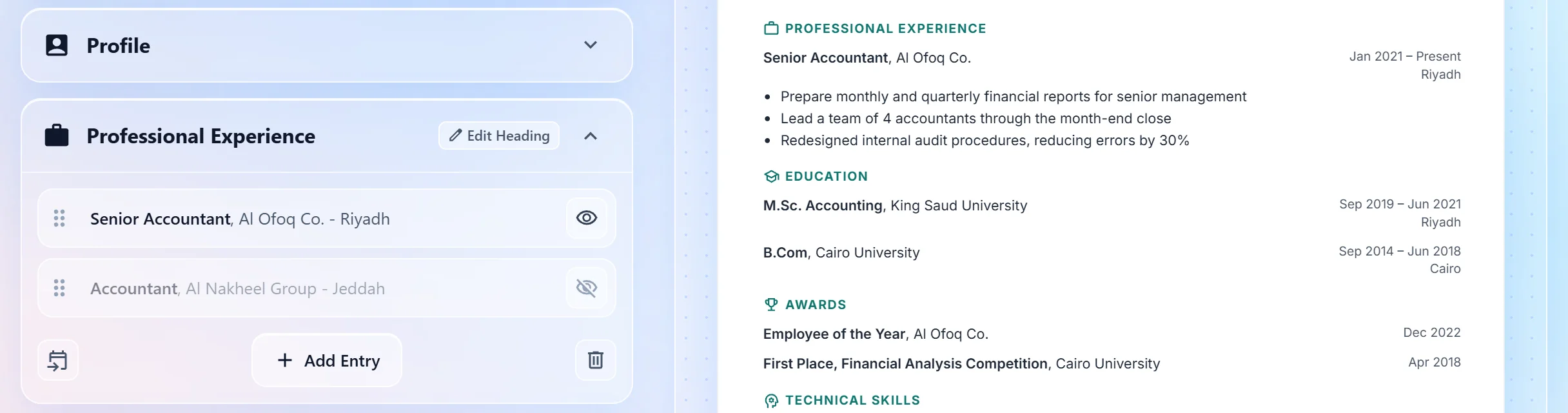
A CV builder can't write your achievements for you, but it can take care of several of the formatting mistakes above. In the DraftPik resume generator:
- Length (mistake 11): the live preview shows A4 or US Letter pages with automatic page breaks.
- Consistent dates (mistake 10): pick one Date Format in the Customize tab, and every date on the CV follows it.
- Tailoring (mistakes 1 and 8): use the eye icon next to an entry to hide it from the CV without deleting it, so your master content stays in the editor.
- Order (mistake 4): drag and drop sections and entries to put your strongest material first.
- Readability (mistake 12): export a plain-text version to check the reading order, and switch templates without retyping if a layout isn't working.
With a free account, Download PDF gives you a clean PDF without a watermark, up to 10 downloads a day. The Free plan includes one saved CV, and Pro adds unlimited CVs and downloads.
FAQ
What is the most common CV mistake?
There's no single answer, but generic CVs and duty-style bullets are two of the easiest to spot. Fixing those two alone, by tailoring each application and rewriting bullets around results, usually improves a CV more than any design change.
Will one typo get my CV rejected?
Not necessarily. It depends on the reader and the role. But typos are among the easiest mistakes to prevent, and in roles where accuracy matters, such as finance, law or writing, they weaken the very claim you're making. Proofread every version you send.
Can a good template prevent CV mistakes?
It helps with layout problems such as inconsistent spacing, messy page breaks and unreadable fonts. It can't fix vague content. The words still have to show what you achieved.
Ready to clean up your CV? Open the resume generator, paste in your current content, and work through the five-minute check with the live preview in front of you. Creating your CV and downloading a clean PDF with a free account costs nothing.