
Picking skills for a CV looks easy until you try it. You either end up with a vague list ("communication, teamwork, MS Office") or a wall of thirty tools that buries the ones that matter. The best skills section is short, specific and clearly matched to the job. This guide shows you how to choose skills, gives example lists for common fields, and explains how to word, group and rate them so they help rather than fill space.
Hard skills and soft skills: why the split matters
Skills on a CV usually fall into two groups:
- Hard skills (also called technical skills) are things you can learn, test and name: software, tools, methods, languages, certifications. Excel, SQL, AutoCAD, bookkeeping, phlebotomy, Google Ads.
- Soft skills (also called human or interpersonal skills) describe how you work with people and problems: negotiation, coaching, conflict resolution, time management.
Keeping them apart makes the section easier to scan. A hiring manager looking for "Power BI" doesn't have to read through "adaptability" to find it.
A hard skill is credible once you name it precisely. A soft skill only becomes credible when the rest of the CV shows it in action, so keep that list short.
How to choose skills for a CV: a four-step method
Step 1: Write a master list
Spend fifteen minutes listing everything you can do at a working level. Go job by job and ask:
- Which tools and software did I use every week?
- Which tasks did people come to me for?
- What did I learn in courses, certificates or side projects?
- Which languages do I speak, and how well?
This list is for you, not the employer. It will be long, and that's the point: you'll pick from it for each application.
Step 2: Mark the skills the job ad repeats
Take two or three ads for the role you want and underline every skill they mention. Skills that appear in more than one ad, or that are listed under "requirements" rather than "nice to have," are your priorities.
Pay attention to wording. If the ads say "financial modeling," don't write only "Excel." Many employers search applications by keyword, so mirroring their vocabulary, where it's true for you, makes you easier to find. Our guide to the ATS-friendly CV explains how that search works.
Step 3: Keep only skills you can talk about
For each skill you plan to list, ask: could I answer two questions about this in an interview? If someone asked "How have you used Tableau?" would you have a real example? If not, leave it off or move it to a "currently learning" line. Listing a skill you can't discuss is a quick way to lose trust.
Step 4: Order by relevance, not by alphabet
Put the skills the job ad emphasizes first. A reader scanning the section will often look at the first few items only. Everything else on the list should still be relevant, just less central.
Transferable skills worth listing, and how to prove them
Some skills are useful in almost any job. They're also the ones most often written as empty words. The fix is to pair each one with proof elsewhere on the CV.
| Skill | Empty version | Proof you can add in an experience bullet |
|---|---|---|
| Communication | "Excellent communication skills" | "Wrote the weekly client update sent to 40 accounts" |
| Problem solving | "Strong problem solver" | "Traced repeated billing errors to a template issue and fixed it" |
| Organization | "Highly organized" | "Coordinated schedules for 12 trainers across 3 sites" |
| Leadership | "Natural leader" | "Trained and supervised 4 new hires during peak season" |
| Customer focus | "Customer-oriented" | "Handled 30+ customer calls a day with a focus on first-call resolution" |
| Adaptability | "Adaptable to change" | "Moved the team's tracking from spreadsheets to a new CRM within a month" |
You don't need all of these. Choose the two or three your target job values most.
Examples of skills to put on your CV, by field
These lists are starting points. Use the ones that are true for you and appear in the ads you're answering.
Office and administration
- Hard: Microsoft 365 (Excel, Outlook, Teams), Google Workspace, document management, minute-taking, travel booking, basic bookkeeping
- Soft: prioritization, discretion with confidential information, written communication
Sales and customer service
- Hard: CRM software (for example Salesforce or HubSpot), pipeline management, product demonstrations, quoting, point-of-sale systems
- Soft: negotiation, active listening, handling objections, staying calm with difficult customers
Marketing and content
- Hard: Google Analytics, Meta Ads, SEO, email marketing platforms, copywriting, Canva or Adobe tools, basic video editing
- Soft: storytelling, collaboration with designers and sales, working to deadlines
Finance and accounting
- Hard: Excel (pivot tables, lookups, Power Query), an ERP system you've used, bank reconciliations, month-end close, VAT returns, IFRS
- Soft: attention to detail, explaining numbers to non-finance colleagues
Software and IT
- Hard: the specific languages, frameworks and platforms you use (for example TypeScript, Vue, Node.js, PostgreSQL, Docker), version control, testing, cloud services
- Soft: code review, writing documentation, explaining technical trade-offs
Healthcare
- Hard: patient assessment, medication administration, electronic health records, infection control, any licenses and life-support certifications you hold
- Soft: empathy, clear handover communication, working under pressure
Engineering and construction
- Hard: AutoCAD, Revit, project scheduling software, quantity surveying, site supervision, health and safety standards
- Soft: coordinating contractors, reporting to clients, problem solving on site
Teaching and training
- Hard: lesson planning, assessment design, learning platforms such as Moodle or Google Classroom
- Soft: classroom management, giving feedback, communicating with parents
If you use AI tools at work, treat them like any other software: name the tool and what you use it for. A vague "AI skills" line tells the reader very little.
How to word and format the skills section
Be specific
"Excel" covers everything from typing a list to building financial models. Add the level of detail that matters for the role:
- Excel → Excel: pivot tables, XLOOKUP, Power Query
- Design software → Figma, Adobe Illustrator
- Languages → Arabic (native), English (fluent, IELTS 7.0), French (basic)
Group long lists
If you have many hard skills, group them under short labels such as Tools, Methods and Platforms. Grouping helps more than shortening when every item is genuinely relevant.
Keep it to a sensible length
There's no magic number, but most CVs work well with somewhere between six and twelve hard skills and three or four soft skills. If your list is longer, it's probably not tailored yet.
Use levels carefully
Skill bars and dots look tidy, but they're hard to interpret: does three out of five mean "good" or "average"? If you use levels, apply them honestly and always write the skill name out as text. For languages, a recognized scale (like CEFR levels A1–C2) or a test score is clearer than a bar.
Show your skills outside the skills section
The skills section is a summary. The proof lives in two other places:
- Your summary. Mention the two skills the job cares about most. See how to write a CV summary for examples.
- Your experience bullets. Each key skill should show up in at least one achievement. "Built a Power BI dashboard for weekly sales reviews" proves more than listing "Power BI" alone.
Skills to leave off your CV
- Assumed basics, such as "email," "internet" or "Microsoft Word," unless the job ad specifically asks for them
- Personality adjectives with no evidence: "hardworking," "passionate," "honest"
- Outdated tools nobody in your field uses anymore, unless the role requires them
- Skills you used once years ago and couldn't demonstrate today
- Languages you don't really speak. If you list a language, expect to be tested on it
- Skills irrelevant to the role that crowd out the relevant ones
For more pitfalls beyond the skills section, see our list of common CV mistakes.
Building your skills section in DraftPik
The DraftPik resume generator gives you two skills sections from the start, matching the split above: Technical Skills and Human Skills. For each entry you can fill in:
- Skill: the name, as you'd want it searched, such as Power BI.
- Information / Sub-skills: optional details, such as DAX, data modeling, report design.
- Skill level: optional, from Novice to Expert.
In the Customize tab, the Sections panel lets you choose how each skills section is laid out: Grid, Rows, Compact, Bubble or Level. Only the Level layout shows skill levels, and the Levels panel lets you pick their style, such as bars, dots or stars. If you'd rather not rate yourself, pick another layout and the levels stay off the page.
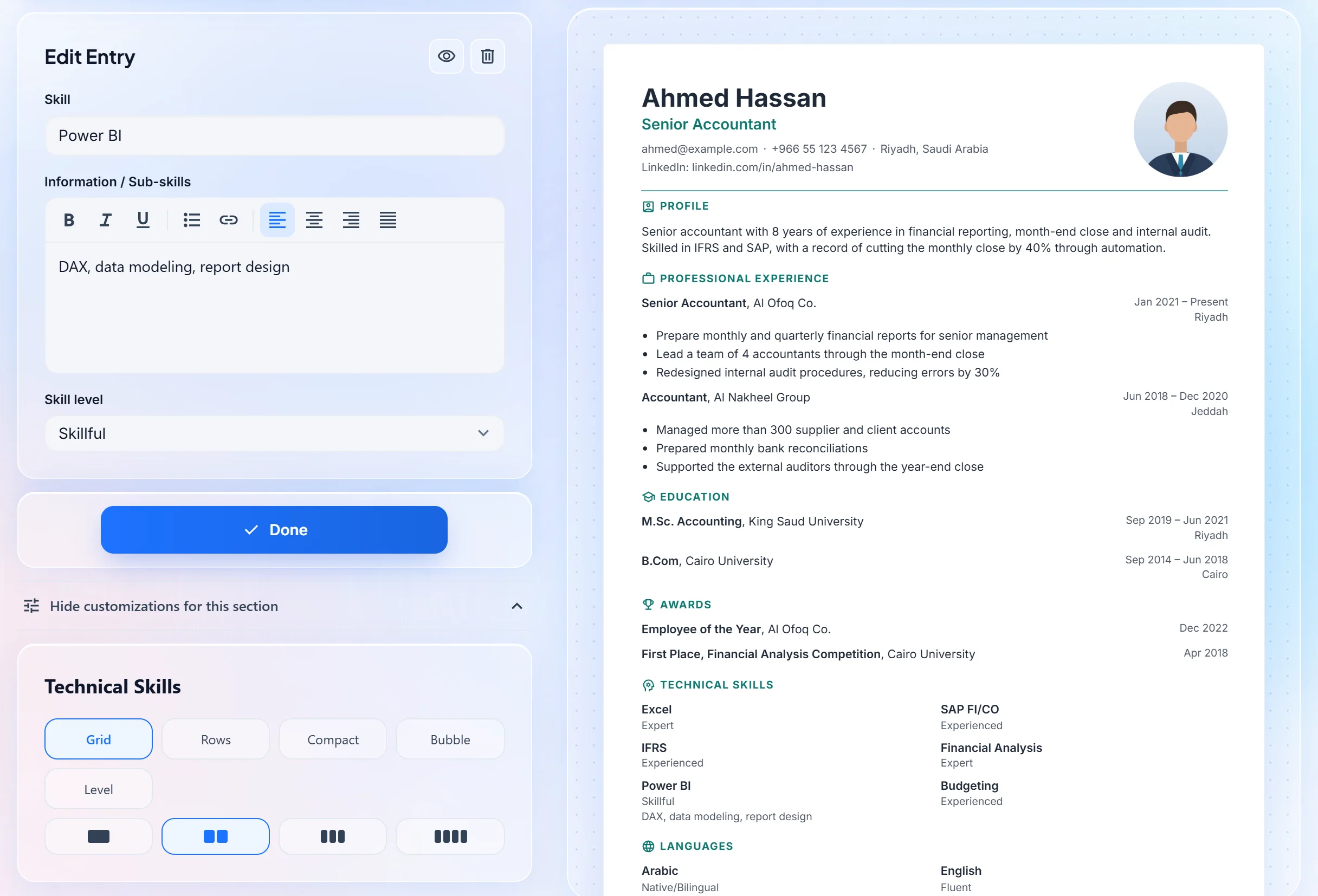
Languages have their own section, with a language level and room for a test score like IELTS. For an extra group such as Tools, add a custom section from Add Content and set its type to Skill. You can also drag sections to move the skills block higher when it's your strongest asset.
FAQ
How many skills should I put on my CV?
Enough to cover what the job asks for, and no more. For most roles that's roughly six to twelve hard skills and three or four soft skills. Tailor the list for each application instead of adding everything.
Should I list hard skills or soft skills first?
Usually hard skills, because they're easier to scan and match against the job ad. Soft skills are more convincing when they're shown in your experience bullets anyway.
Should I rate my skills with bars or stars?
Only if the rating tells the reader something useful. Ratings are subjective, so many people skip them for hard skills and use clear labels for languages instead, such as "fluent" or a test score.
Is it okay to copy skills from the job description?
Yes, if you genuinely have them. Using the same wording as the ad helps readers and search tools match you to the role. Never add a skill just because it's in the ad.
Ready to put your list together? Open the free resume generator, add your skills to the Technical Skills and Human Skills sections, and try a few layouts in the live preview. The Free plan includes one CV, and with a free account you can download it as a clean PDF, up to 10 downloads a day.